Personal Portfolio Website
Project Overview
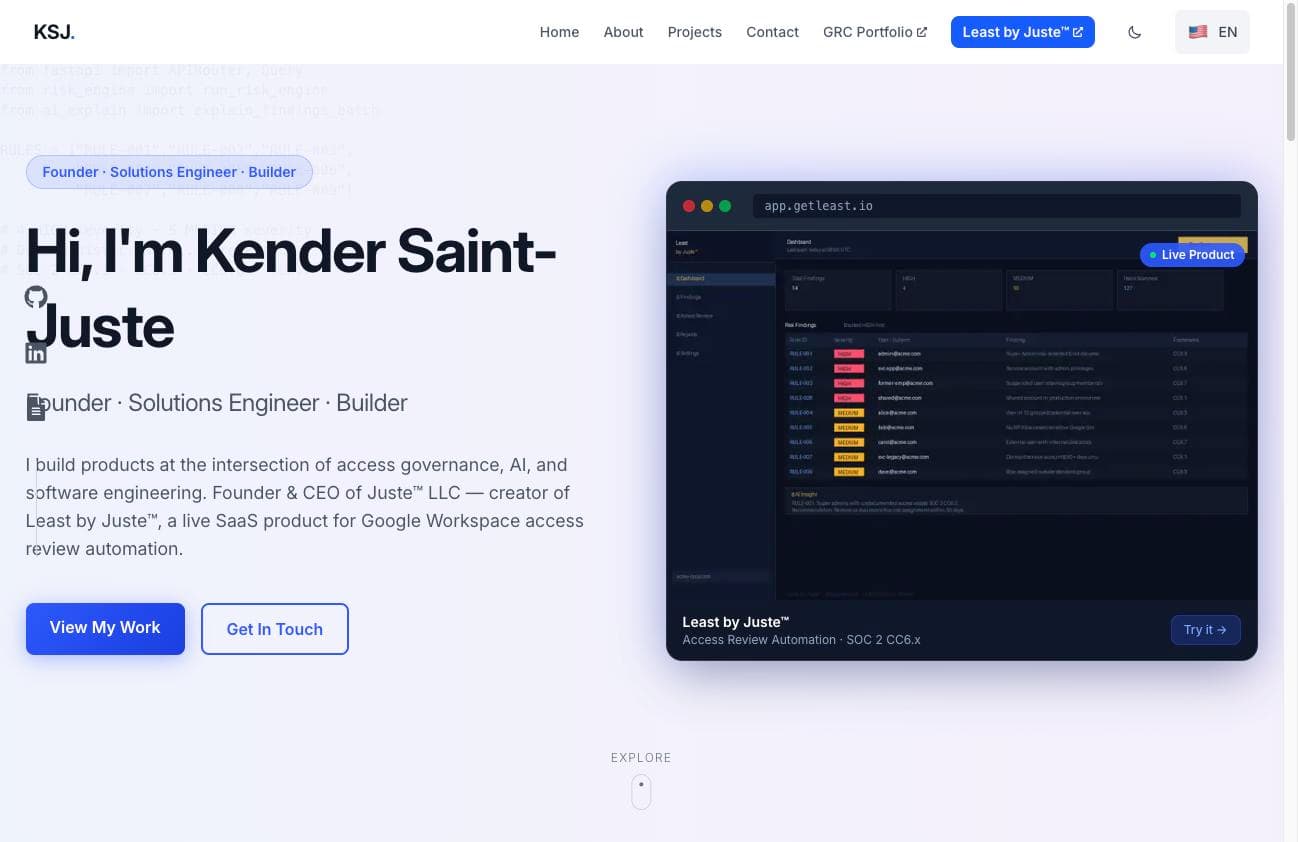
This portfolio website serves as a comprehensive showcase of my skills, projects, and professional journey as a software developer. Built using modern web technologies including Next.js, React, and Tailwind CSS, the site features responsive design, dark/light mode functionality, and interactive UI elements.
The project itself demonstrates my abilities in frontend development, UI/UX design principles, and implementation of serverless functionality. It was designed with accessibility and performance in mind, ensuring a seamless experience for all visitors.
Key Features
Modern React Architecture
Built with Next.js and React using the latest patterns and practices for optimal performance.
Responsive Design
Fully responsive layout that works seamlessly across mobile, tablet, and desktop devices.
Dark/Light Mode
Theme switching functionality that respects user preferences and enhances accessibility.
Interactive UI
Smooth animations and transitions powered by Framer Motion for an engaging user experience.
Contact Form Integration
Serverless API route with Nodemailer for sending emails directly from the contact form.
SEO Optimization
Proper metadata and structured content to enhance search engine visibility.
Development Process
Requirements Gathering & Planning
Defined the key portfolio requirements, including showcasing projects, skills, and providing contact information. Created wireframes and selected the technology stack.
Design & UI Development
Implemented a clean, responsive UI with Tailwind CSS. Created a cohesive design system with dark/light mode support. Built reusable components for consistency across pages.
Core Functionality
Developed project showcases, skills visualization, and a responsive navigation system. Implemented smooth page transitions and animations using Framer Motion.
Backend Integration
Set up serverless API routes for the contact form. Implemented email functionality using Nodemailer to forward contact messages directly to my inbox.
Testing & Optimization
Conducted cross-browser and mobile testing. Optimized images and implemented lazy loading for better performance. Made accessibility improvements throughout the site.
Technologies Used
- Next.js 14 for frontend framework
- React for component architecture
- TypeScript for type safety
- Tailwind CSS for styling
- Framer Motion for animations
- Next.js API Routes for backend
- Nodemailer for email functionality
- Vercel for hosting and deployment
Performance Metrics
Code Highlights
"use client";

import { useState } from 'react';
import { motion } from 'framer-motion';

export default function ContactForm() {
  const [formData, setFormData] = useState({
    name: '',
    email: '',
    subject: '',
    message: ''
  });
  const [errors, setErrors] = useState({});
  const [status, setStatus] = useState('idle');

  const validateForm = () => {
    const newErrors = {};

    if (!formData.name.trim()) {
      newErrors.name = 'Name is required';
    }

    if (!formData.email.trim()) {
      newErrors.email = 'Email is required';
    } else if (!/^[A-Z0-9._%+-]+@[A-Z0-9.-]+.[A-Z]{2,}$/i.test(formData.email)) {
      newErrors.email = 'Invalid email address';
    }

    if (!formData.message.trim()) {
      newErrors.message = 'Message is required';
    }

    setErrors(newErrors);
    return Object.keys(newErrors).length === 0;
  };

  const handleSubmit = async (e) => {
    e.preventDefault();

    if (!validateForm()) {
      return;
    }

    setStatus('sending');

    try {
      const response = await fetch('/api/contact', {
        method: 'POST',
        headers: {
          'Content-Type': 'application/json',
        },
        body: JSON.stringify(formData),
      });

      if (response.ok) {
        setStatus('success');
        setFormData({ name: '', email: '', subject: '', message: '' });
      } else {
        setStatus('error');
      }
    } catch (error) {
      setStatus('error');
    }
  };

  return (
    <form onSubmit={handleSubmit} className="space-y-6">
      {/* Form fields */}
    </form>
  );
}"use client";
import { createContext, useContext, useEffect, useState } from 'react';
const ThemeContext = createContext({
theme: 'light',
setTheme: () => null,
toggleTheme: () => null,
});
export function ThemeProvider({ children }) {
const [theme, setTheme] = useState('light');
useEffect(() => {
const storedTheme = localStorage.getItem('theme') || 'light';
setTheme(storedTheme);
if (storedTheme === 'dark') {
document.documentElement.classList.add('dark');
} else {
document.documentElement.classList.remove('dark');
}
}, []);
const toggleTheme = () => {
const newTheme = theme === 'light' ? 'dark' : 'light';
setTheme(newTheme);
localStorage.setItem('theme', newTheme);
if (newTheme === 'dark') {
document.documentElement.classList.add('dark');
} else {
document.documentElement.classList.remove('dark');
}
};
return (
<ThemeContext.Provider value={{ theme, setTheme, toggleTheme }}>
{children}
</ThemeContext.Provider>
);
}
export const useTheme = () => useContext(ThemeContext);Challenges & Solutions
Dark Mode Implementation
Challenge:Implementing a dark mode that works seamlessly with Next.js 14's App Router while avoiding hydration mismatches.
Solution: Created a custom ThemeProvider component using React Context API that synchronizes with localStorage and the system preference. Used the next-themes library to handle the complexities of server-side rendering with theme detection.
Contact Form Backend
Challenge: Creating a secure and reliable backend for the contact form without setting up a dedicated server.
Solution: Utilized Next.js API Routes to create a serverless backend function that processes form submissions and sends emails using Nodemailer. Implemented proper validation and error handling to ensure security and reliability.
Performance Optimization
Challenge: Ensuring fast page loads while maintaining visual appeal with animations and images.
Solution: Used Next.js Image component for optimized image loading, implemented lazy loading for below-the-fold content, and carefully crafted Framer Motion animations to minimize layout shifts and maintain smooth performance.
Lessons Learned
This project provided valuable insights and learning opportunities:
- Modern React development with Next.js App Router architecture
- Implementing accessible design practices including keyboard navigation and color contrast
- Serverless backend development for form processing
- Optimizing animations for performance while maintaining visual appeal
- Managing theme switching with proper user preference detection
- Building a portfolio that effectively showcases both design and technical skills
Relevance to Internship Goals
This project demonstrates several skills that are directly applicable to frontend and full-stack development internships:
- Proficiency with modern React development patterns and Next.js framework
- Ability to create responsive, accessible, and visually appealing user interfaces
- Experience with TypeScript for type safety and code quality
- Implementation of serverless backend functionality for form processing
- Understanding of performance optimization and best practices
- Creating maintainable and well-structured component architecture
- Implementing client-side functionality with proper state management