Elderly Care Management System — Foundation of OneCare™
Project Overview
The Elderly Care Management System is a comprehensive platform designed to improve the quality and efficiency of care provided to elderly individuals. The application connects caregivers, healthcare providers, and family members, enabling better coordination and monitoring of care activities.
This project began as my SWENG 861 capstone at Penn State, where I implemented a full-stack solution addressing real-world challenges in elderly care management. It's now the technical foundation for OneCare by Juste™, an early-stage AI-powered elderly care platform I'm developing under Juste™ LLC.
Key Features
Patient Management
Track detailed patient information including medical history, medication schedules, and care requirements.
Caregiver Scheduling
Efficiently assign caregivers to patients with conflict detection and workload balancing.
Medication Tracking
Monitor medication administration with reminders and verification to ensure proper care.
Family Portal
Allow family members to view care updates, communicate with caregivers, and receive alerts.
Real-time Notifications
Immediately alert relevant parties about important updates or emergency situations.
Analytics Dashboard
Visualize care metrics and patient wellness indicators to identify trends and improve care quality.
Technical Challenges & Solutions
Challenge: Role-Based Access Control
Creating a system that served different user types (caregivers, family members, administrators) with appropriate permissions and interfaces.
Solution:I implemented a robust role-based access control system that dynamically renders UI components and restricts API access based on the user's role. This included custom middleware for API route protection and context-based component rendering.
Challenge: Real-time Medication Tracking
Ensuring accurate and timely medication administration with verification and accountability.
Solution: I built a real-time medication tracking system using Firebase for immediate updates. The system includes confirmation dialogs, timestamps, and caregiver verification to ensure proper medication administration and create an audit trail.
Challenge: Data Synchronization Across User Types
Keeping all users (caregivers, family members, administrators) updated with relevant information in real-time.
Solution:I implemented a publish-subscribe pattern using Firebase's real-time database that ensures all authorized users receive immediate updates relevant to their role. This included custom filters and event listeners for efficient data transmission.
Technologies Used
- React for frontend development
- Node.js & Express for API development
- MongoDB for database storage
- Firebase for real-time updates
- Material UI for component library
- JWT for secure authentication
- React Context API for state management
- React Query for data fetching
Project Metrics
Code Highlights
// MongoDB Schema for Patient model
const mongoose = require('mongoose');

const patientSchema = new mongoose.Schema({
  firstName: {
    type: String,
    required: true,
    trim: true
  },
  lastName: {
    type: String,
    required: true,
    trim: true
  },
  dateOfBirth: {
    type: Date,
    required: true
  },
  gender: {
    type: String,
    enum: ['Male', 'Female', 'Other'],
    required: true
  },
  contactInfo: {
    phone: String,
    email: String,
    address: {
      street: String,
      city: String,
      state: String,
      zipCode: String
    }
  },
  emergencyContact: {
    name: String,
    relationship: String,
    phone: String
  },
  medicalInformation: {
    conditions: [String],
    allergies: [String],
    medications: [{
      name: String,
      dosage: String,
      frequency: String,
      startDate: Date,
      endDate: Date,
      notes: String
    }]
  },
  careNeeds: {
    mobilityAssistance: Boolean,
    feedingAssistance: Boolean,
    medicationManagement: Boolean,
    bathingAssistance: Boolean,
    dementiaSupport: Boolean,
    otherNeeds: [String]
  },
  assignedCaregivers: [{
    type: mongoose.Schema.Types.ObjectId,
    ref: 'Caregiver'
  }],
  careSchedule: [{
    day: String,
    startTime: String,
    endTime: String,
    caregiver: {
      type: mongoose.Schema.Types.ObjectId,
      ref: 'Caregiver'
    },
    tasks: [String]
  }],
  notes: [{
    text: String,
    date: {
      type: Date,
      default: Date.now
    },
    author: {
      type: mongoose.Schema.Types.ObjectId,
      ref: 'User'
    }
  }]
});

// Virtual for patient's full name
patientSchema.virtual('fullName').get(function() {
  return this.firstName + ' ' + this.lastName;
});

// Virtual for patient's age
patientSchema.virtual('age').get(function() {
  const today = new Date();
  const birthDate = new Date(this.dateOfBirth);
  let age = today.getFullYear() - birthDate.getFullYear();
  const m = today.getMonth() - birthDate.getMonth();
  if (m < 0 || (m === 0 && today.getDate() < birthDate.getDate())) {
    age--;
  }
  return age;
});

module.exports = mongoose.model('Patient', patientSchema);import React, { useState } from 'react';
import { Card, CardContent, CardHeader, Button, Typography, Dialog,
DialogTitle, DialogContent, DialogActions, Chip } from '@material-ui/core';
import { format } from 'date-fns';
import { useMutation } from 'react-query';
import { updateMedicationStatus } from '../api/medicationService';
const MedicationCard = ({ medication, patientId, onStatusUpdate }) => {
const [confirmDialogOpen, setConfirmDialogOpen] = useState(false);
const [statusMessage, setStatusMessage] = useState('');
// Mutation for updating medication status
const mutation = useMutation(
(data) => updateMedicationStatus(patientId, medication.id, data),
{
onSuccess: (data) => {
setStatusMessage('Medication marked as taken successfully');
onStatusUpdate(medication.id, true);
setTimeout(() => {
setStatusMessage('');
setConfirmDialogOpen(false);
}, 1500);
},
onError: (error) => {
setStatusMessage('Error: ' + error.message);
}
}
);
const handleMarkAsTaken = () => {
setConfirmDialogOpen(true);
};
const confirmMedicationTaken = () => {
const currentTime = new Date();
mutation.mutate({
status: 'taken',
takenAt: currentTime,
takenBy: 'current-caregiver-id' // In real app, get from auth context
});
};
return (
<Card className="medication-card">
<CardHeader
title={medication.name}
subheader={
<div className="medication-subheader">
<Chip
label={medication.status === 'taken' ? 'Active' : 'Not Taken'}
color={medication.status === 'taken' ? 'primary' : 'default'}
/>
</div>
}
/>
<CardContent>
<Typography variant="body1">
<strong>Dosage:</strong> {medication.dosage}
</Typography>
<Typography variant="body1">
<strong>Instructions:</strong> {medication.instructions}
</Typography>
<div className="medication-schedule">
<Typography variant="h6">Today's Schedule:</Typography>
{medication.schedule.map((time, index) => (
<div key={index} className="schedule-item">
<Typography>{format(new Date(time.scheduledTime), 'h:mm a')}</Typography>
<Typography className={time.status === 'taken' ? 'taken' : 'not-taken'}>
{time.status === 'taken' ? 'Taken' : 'Not taken'}
</Typography>
</div>
))}
</div>
<Button
variant="contained"
color="primary"
fullWidth
onClick={handleMarkAsTaken}
disabled={medication.status === 'taken'}
>
Mark as Taken
</Button>
</CardContent>
{/* Confirmation Dialog */}
<Dialog open={confirmDialogOpen} onClose={() => setConfirmDialogOpen(false)}>
<DialogTitle>Confirm Medication</DialogTitle>
<DialogContent>
{statusMessage ? (
<Typography color="primary">{statusMessage}</Typography>
) : (
<Typography>
Are you sure you want to mark {medication.name} as taken?
This action will be recorded in the patient's medical record.
</Typography>
)}
</DialogContent>
<DialogActions>
<Button onClick={() => setConfirmDialogOpen(false)} color="default">
Cancel
</Button>
<Button
onClick={confirmMedicationTaken}
color="primary"
disabled={!!statusMessage}
>
Confirm
</Button>
</DialogActions>
</Dialog>
</Card>
);
};
export default MedicationCard;Screenshots
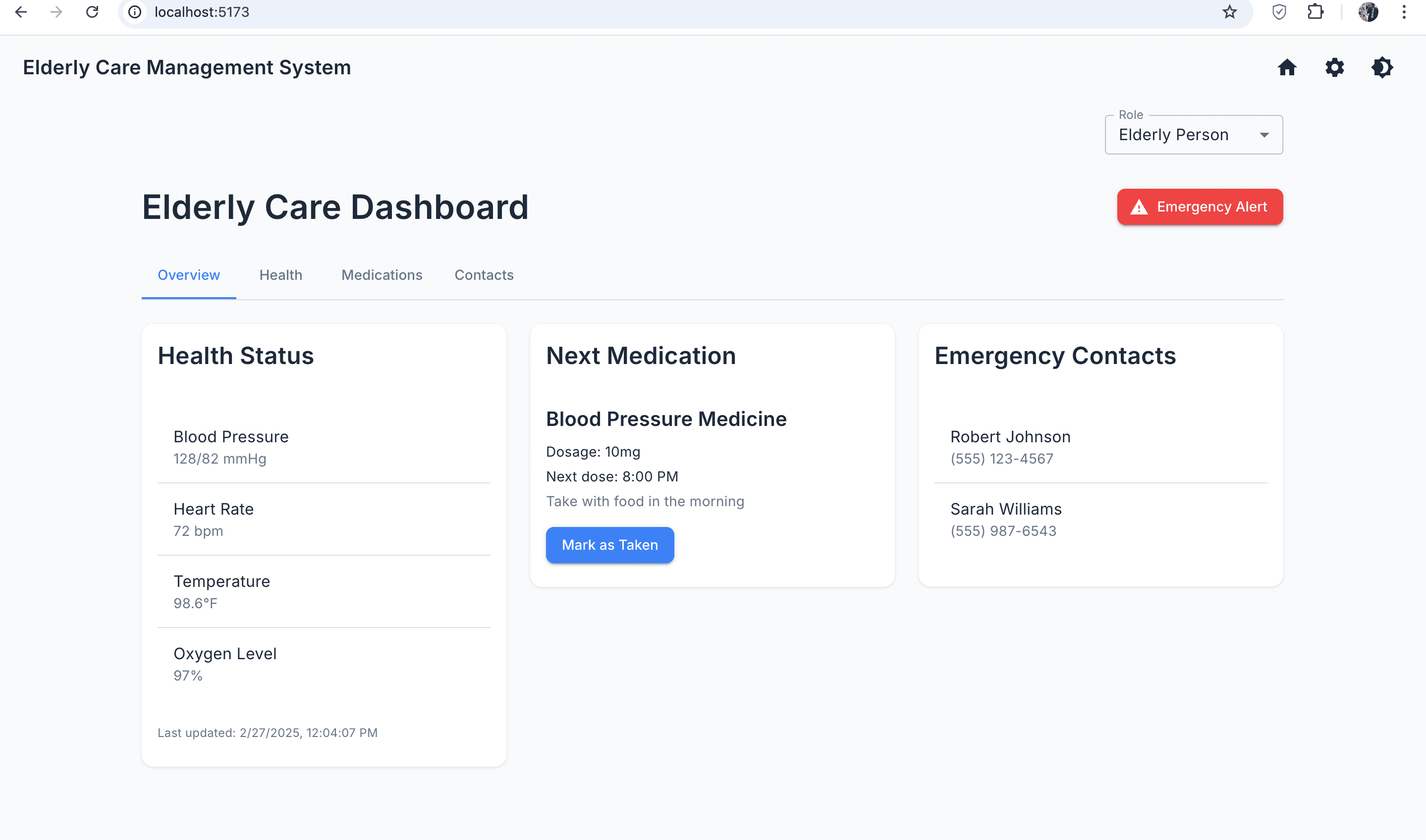
Patient Dashboard Overview
Main dashboard showing patient health metrics and medication schedule
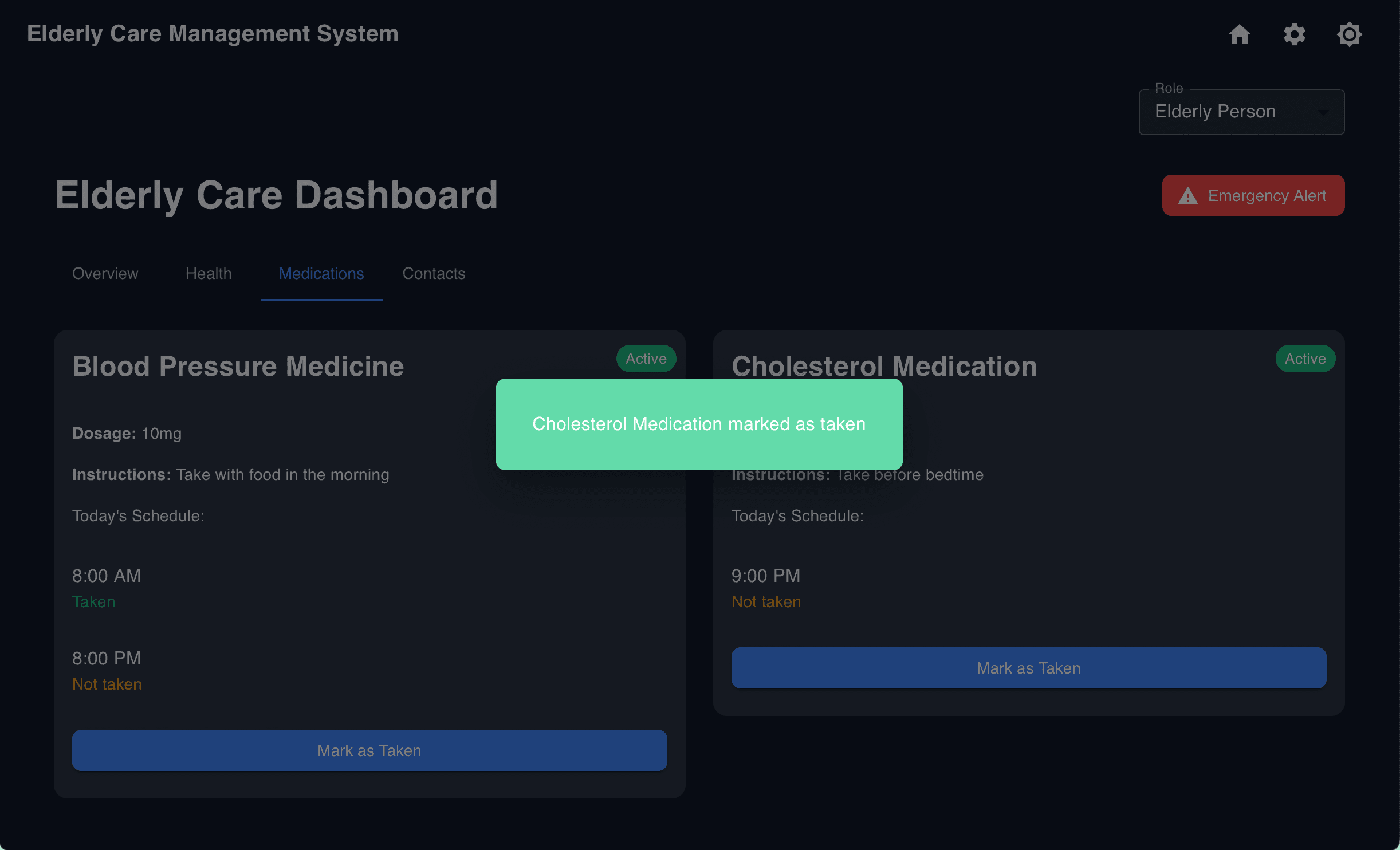
Medication Tracking Interface
Medication tracking system with confirmation dialogs for caregiver accountability
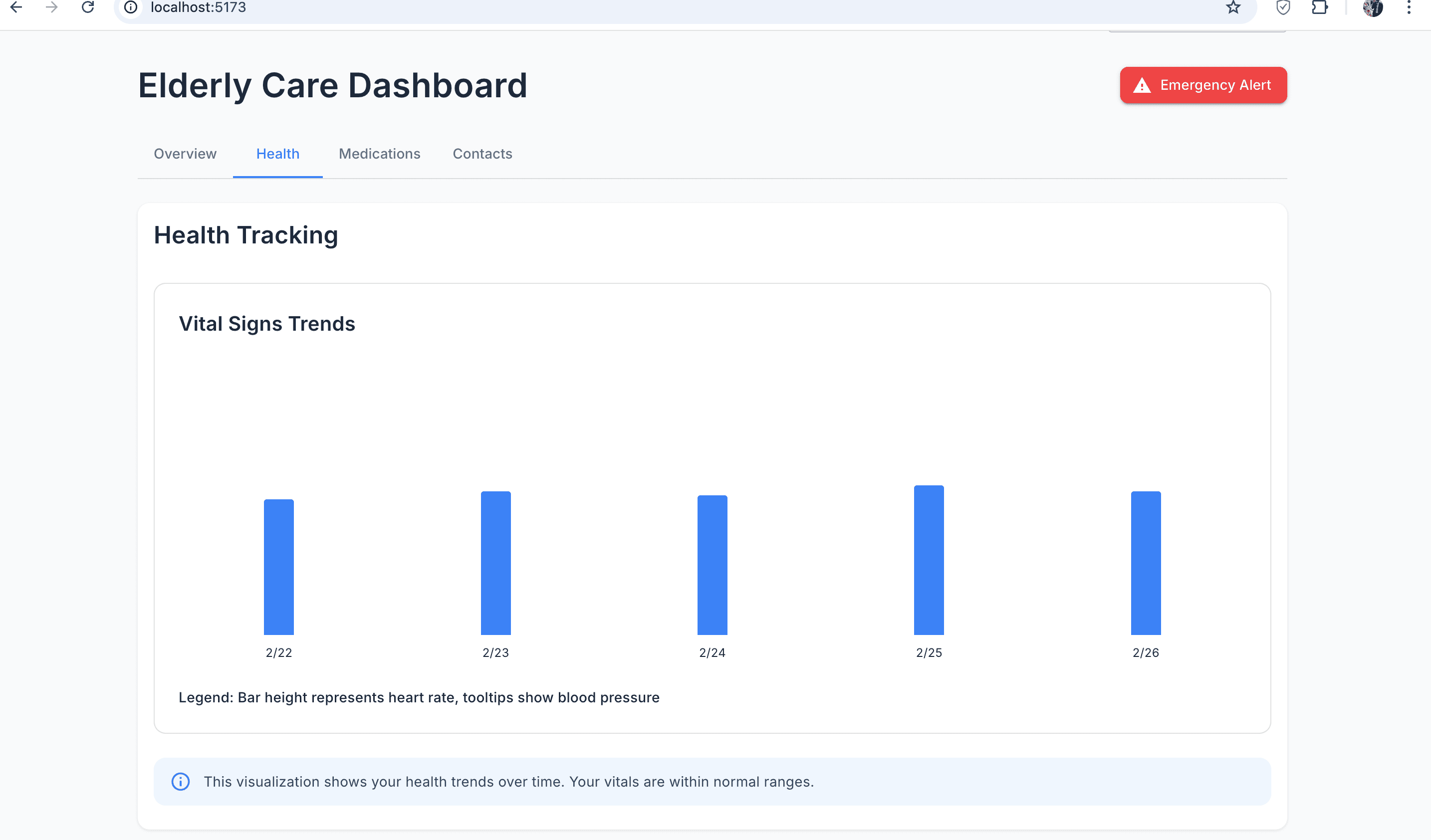
Health Monitoring Panel
Real-time health metrics monitoring with historical trends

Caregiver Dashboard
Caregiver-focused interface showing assigned patients and tasks
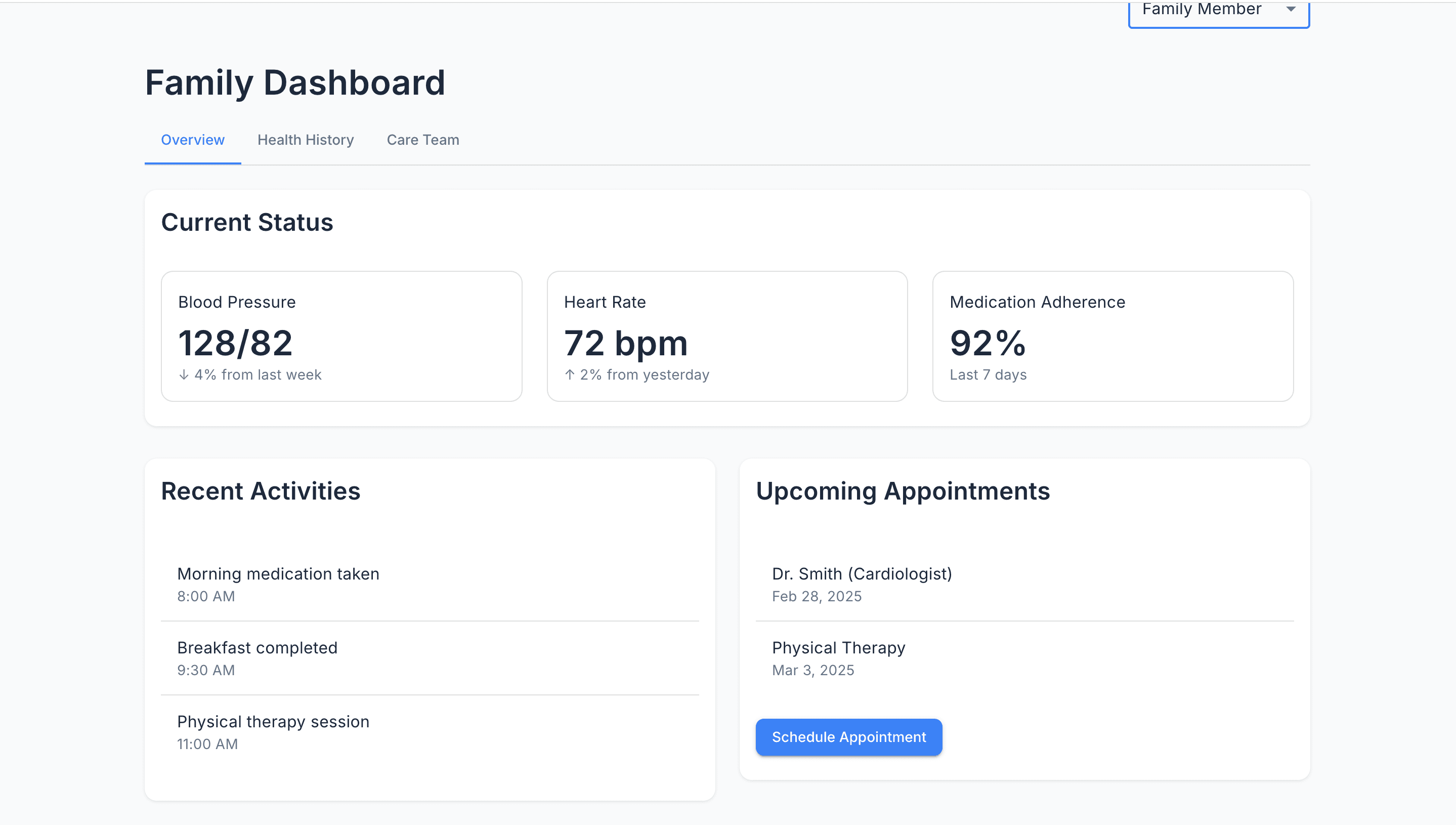
Family Portal
Family member view showing care updates and communication options
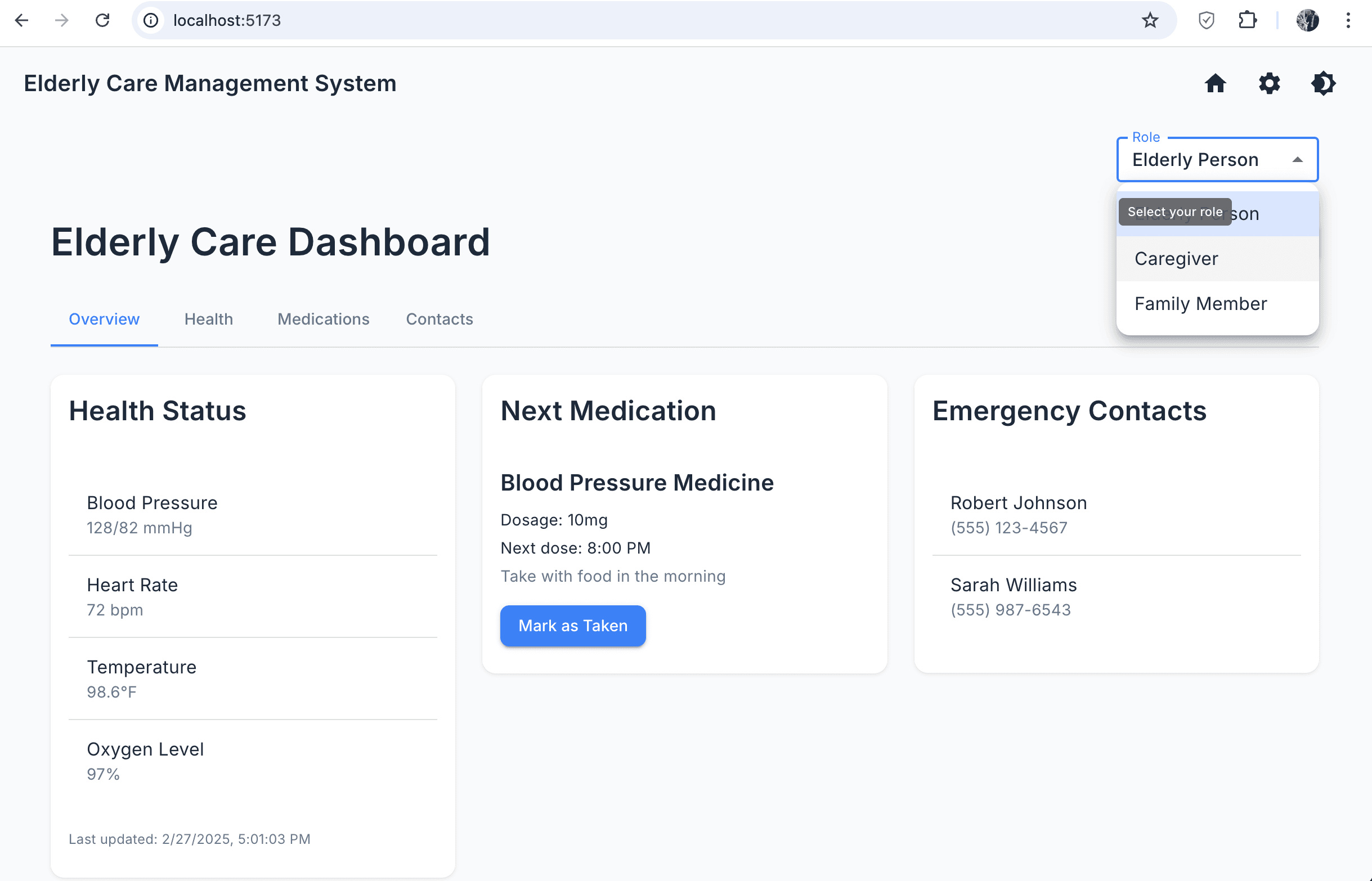
Role Selection Screen
Role-based access control for different user types
Lessons Learned
This project provided valuable insights and learning opportunities:
- Designing systems for multiple user types with varying needs and permissions
- Implementing real-time data synchronization across different client interfaces
- Creating secure, role-based access control systems
- Building intuitive interfaces for users with varying levels of technical proficiency
- Handling sensitive personal and medical data in compliance with best practices
- Developing notification systems for time-critical healthcare events
- Scaling database models to accommodate complex healthcare data relationships
Relevance to Internship Goals
This project demonstrates skills that are directly applicable to software engineering internships:
- Full-stack development across React, Node.js, and MongoDB (MERN stack)
- Creating complex data models and relationships for real-world applications
- Implementing secure authentication and authorization systems
- Building accessible and responsive UI interfaces with modern component libraries
- Developing for multiple user types with different access levels and needs
- Working with real-time data and notifications in a critical application domain
- Problem-solving in complex domains with multiple interconnected systems